 Cause Diary
Your cases, tomorrow’s list and every order, in one diary.
Cause Diary is a case diary for lawyers and litigants in India. Add your cases once. It keeps their hearing dates, cause list entries and orders up to date from the courts’ own public websites.
Coming soon for iPhone, iPad and Mac
No account needed. No advertisements. Your cases stay on your device and in your own iCloud.
Tuesday
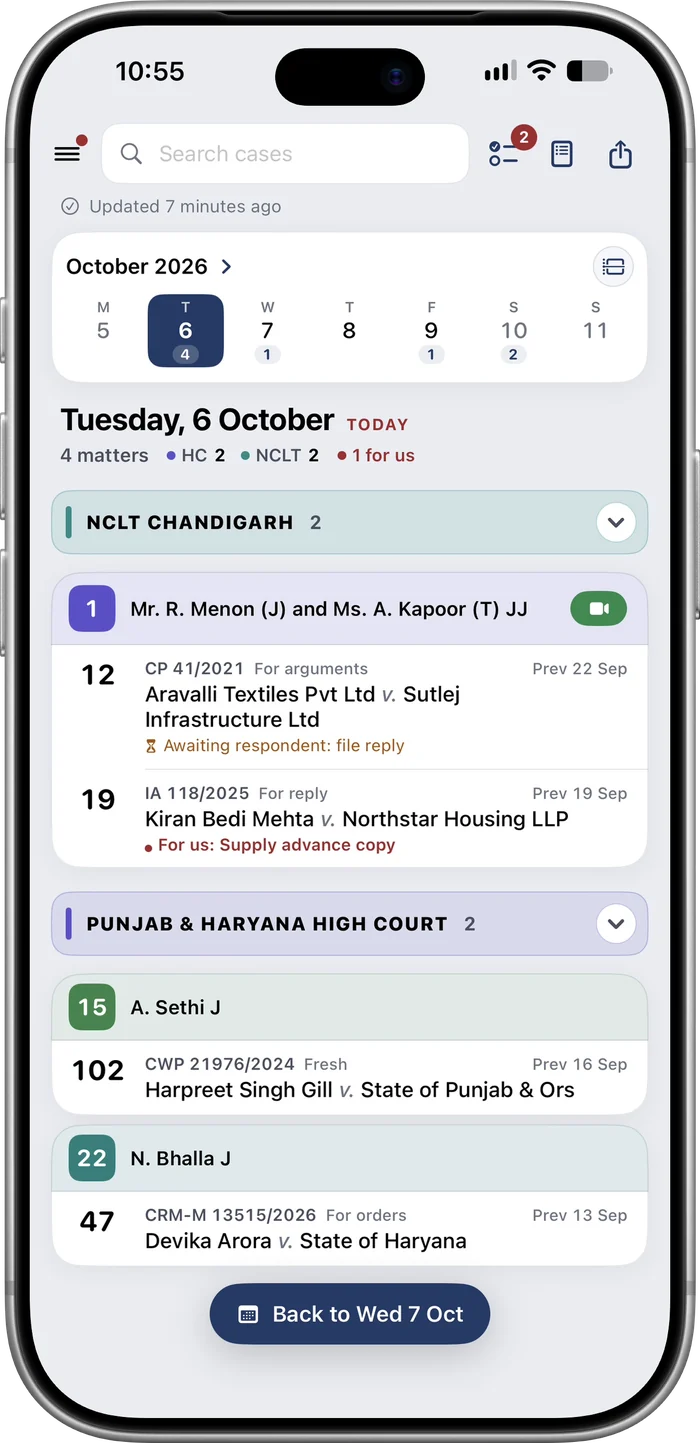
6 October 2026279 / 86An illustration. The parties and case numbers are invented.
What it does
What you would write in a court diary, kept up to date for you.
Adding cases
Find your cases in the court’s record
Search the Punjab and Haryana High Court by case number, party name or enrolment number. An enrolment number brings up every case you appear in.
Type the case number in plain words
Type “CWP 1234 of 2026” and the app finds the case. You can also pick the case type and the year from a list and enter the number.
Any other court or tribunal
Add cases manually for about seventy forums, including the Supreme Court, every High Court, NCLT benches, NCLAT, district courts, DRT and consumer commissions.
Import from a spreadsheet
Import your cases from an Excel or CSV file. High Court and NCLAT cases in the file are matched with the courts’ records.
Follow a filing by its diary number
See the registry’s objections as they are raised. Once the filing is numbered, the case is added to your desk automatically.
Every day
Tomorrow’s list, the evening before
Your matters in the cause list with court, item number and bench, grouped by courtroom, with the video link where the court gives one.
Supplementary lists
The app checks again in the morning, so a matter added late to the day’s list still shows up.
The live board
During court hours, see which item each of your courtrooms is hearing and how far away yours is. It can also show on the Lock Screen and in the Dynamic Island.
NCLT and NCLAT
NCLT cause lists for the bench your case is before, and NCLAT hearings and orders from the tribunal’s record.
Orders
Every order, saved
Orders are downloaded as PDF files, so you can open them even without a connection.
Summaries made on your device
A short summary of each order, with the next date and what the order requires of you. Summaries are made on the device with Apple Intelligence, where your device supports it.
A to-do list from the orders
Replies to file, dates to keep and directions to comply with, gathered in one list with reminders.
Staying informed
Alerts
Get notified of a new order, a new listing or a changed date, with a brief each evening of the next day’s matters.
Your calendar, widgets and Siri
Hearings in a calendar of their own, widgets for the Home Screen, and answers from Siri such as what is listed tomorrow.
Working together
Share with your team
Invite colleagues through iCloud. Everyone sees the same cases, notes and to-do list, and each person’s matters are marked.
Notes, pins and export
Keep a note on any case, pin the ones that matter, and export your case list as a spreadsheet at any time.
Private
No account needed
There is nothing to sign up for. Your cases stay on your device and in your own iCloud. No advertisements and no tracking.
App lock
Lock the app with Face ID or Touch ID.
Two more pages from the app
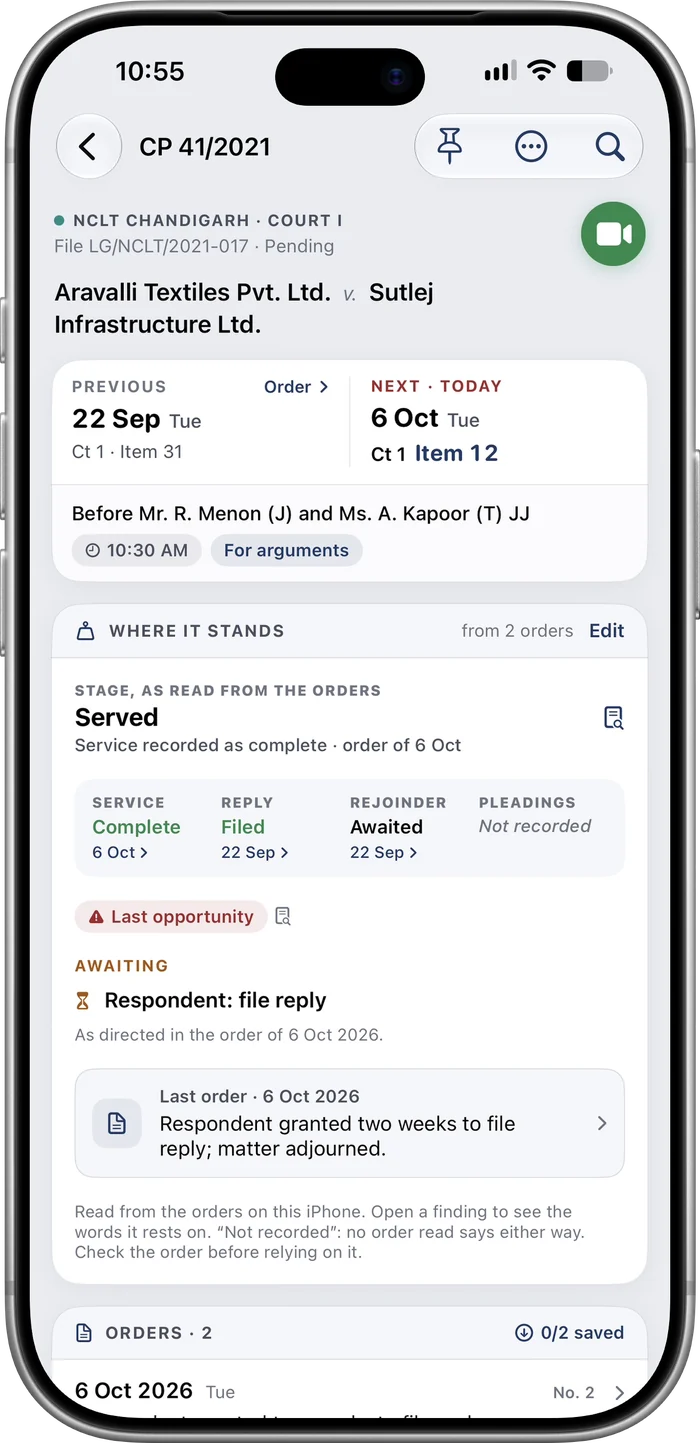
Where a case stands
The app reads the orders in a case and sets out its stage: service, reply, rejoinder, and what is awaited from whom. Each finding opens the words in the order it rests on.
Check the order before relying on it.
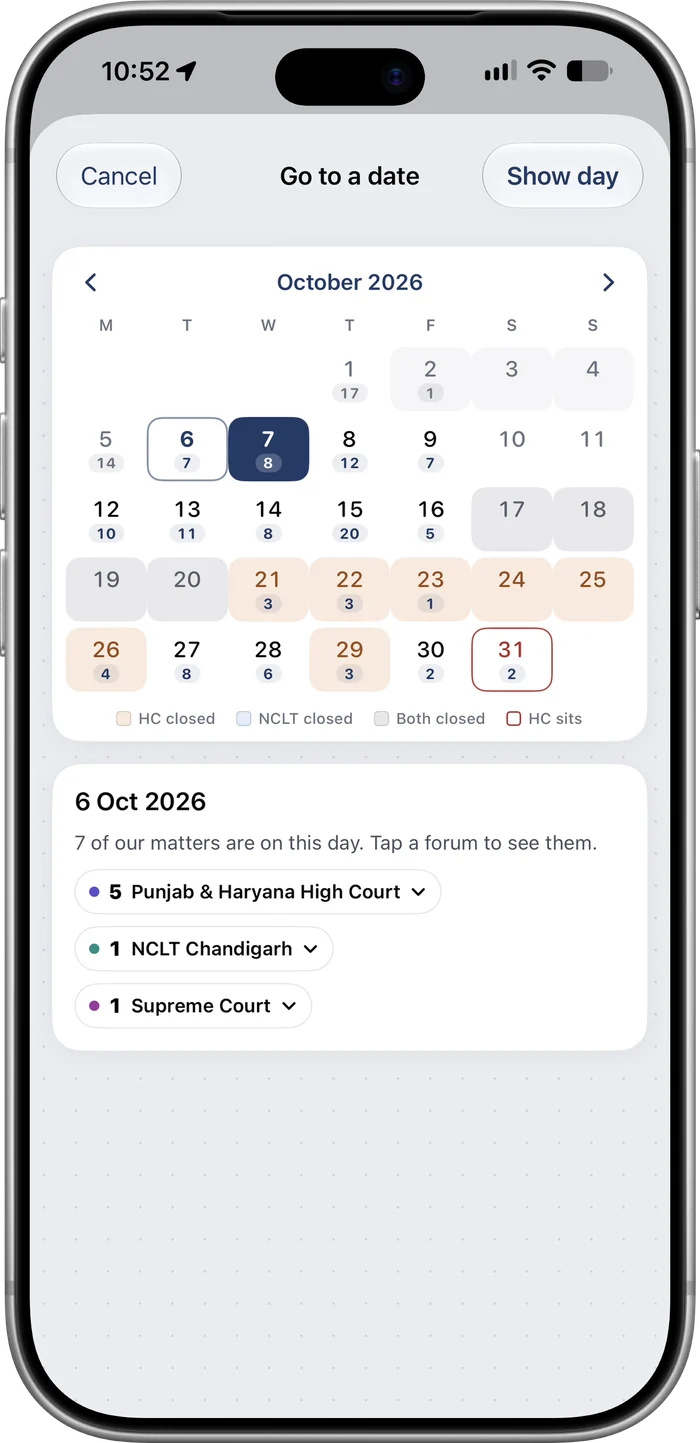
The month, with the courts’ holidays
Every date shows how many of your matters are listed. Days when the High Court or the NCLT is closed are shaded, and a tap on any date shows its matters by forum.
How it works
Three steps, and no sign-up.
Start a desk
Open the app and start a new desk. It is stored on your device.
Add your cases
From the court’s record, from a spreadsheet, or manually.
Stay up to date
Dates, cause lists and orders are updated automatically, and the app tells you what changed.
Courts it reads
Cases of any other court or tribunal can be added manually, with their dates and documents.
| Court | What the app reads automatically |
|---|---|
| Punjab and Haryana High Court | Case search, hearing history, applications, cause lists, supplementary lists, the display board, orders, the court’s calendar, and fresh filings with their objections. |
| NCLAT | Case search, hearings and orders, New Delhi and Chennai. |
| NCLT | Cause lists of the benches in fifteen cities. Case details are entered manually. |
| Every other forum | Added manually: the case, its next date, notes and documents. |
More courts will follow. Courts whose websites require a captcha are not read automatically. Their cases can be added manually.
Cause Diary is an aid, not an official record. The information it shows comes from public websites that we do not control, and it can be late, incomplete or wrong. Do not rely on the app alone for any date, listing or order: check the court’s own record and the certified copy.
The app does not give legal advice. See the Terms of Use and the Privacy Policy, or go to Support for help.